Administrative rights is something which mainly affects Windows Vista and Windows 7 and Windows 10 users. Most RentMaster functions can be performed without administrator rights, but not all of them.
Windows Vista and newer version of windows have hightened security settings. As a result, some things can not be done if you do not have the highest security settings known as 'Administrative Rights'.
Follow these steps to increase the security settings while running RentMaster.
Note - It is advisable to do a database backup before you start. Also take note of your current license key which you can find by going to the Help menu inside RentMaster and choose About RentMaster. You can also undo the steps below if needed.
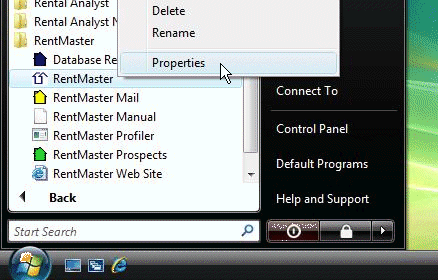
1. First find the RentMaster icon on the windows start menu, or your desktop, or both. Whichever icon you use to run RentMaster. Right-click that icon and choose Properties.
If you are using Windows 10, follow these instructions http://www.techadvisor.co.uk/how-to/windows/how-run-programs-as-administrator-in-windows-10-3632744/
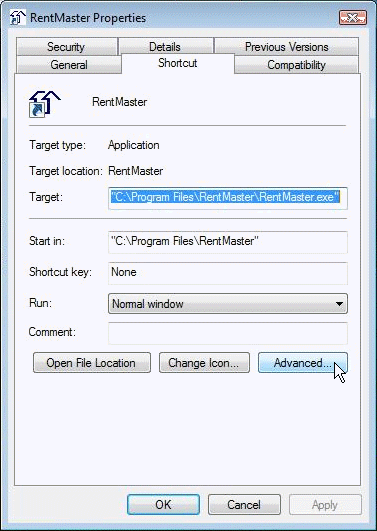
2. Find and click the Advanced button on the Shortcut tab.
3. Turn on the option which says 'Run as Administrator'.
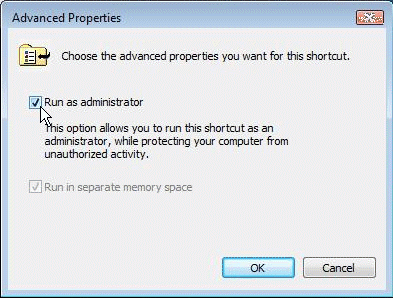
Depending on your current windows security settings, you may be asked to enter an administrators password, and you may also be asked to confirm you want to run the program in administrator mode each time you run the program from then on.
If after restarting, you find some of your recently entered information is missing, restore the database you backed up at the beginning by going to the File menu and choose Database Maintenance and then restore. Also if RentMaster now tells you that you are running a trial version, simply re-enter your license key and complete the activation process.
